Labels

Sunday, February 7, 2021

We Want Democracy !


Dear World,

Myanmar has gone dark.
Just 6 days after Myanmar military has seized control of the country in a coup and detaining the country's leader Aung San Suu Kyi and the democratically-elected leaders while making up charges to hold them, Myanmar has now gone dark. First, the military stopped the use of Facebook where Myanmar civilians have been sharing news and Civil Disobediemce Campaigns. Now, the military has completely shut down the internet, cutting off the country from the rest of the world.
Just 7 days after Myanmar military turn on the internet since 2:00 PM, but we can't take the update social media. The Civil disobedience campaigns have spreaded across the country, with health professionals being at the forefront of it. Myanmar civilians are fighting peacefully for the end to military dictatorship once and for all. We are all fighting peacefully for democracy.
The pans and pots bearing campaign is still going on every night at 8 pm to show rejection to the coup. In Myanmar tradition, pots and pans are banged to drive evil from your home.
May the World know that we are resisting the coup and fighting back peacefully.
Please help Myanmar by calling your Government and your representatives to take immediate and swift actions toward these military junta.
 
credit:
#savemyanamar
#rejectmilitarycoupmyanmar
#HearTheVoiceOfMyanmar

Friday, July 17, 2015

Tuesday, July 7, 2015

Update Proxy IP (7.7.15)

All US Proxies


Figure (1)

All Country Proxies

                                                           
Figure (2)

Figure (3)
 
References
       
          Figure (1) ----> http://www.us-proxy.org/
          Figure (2) ----> http://www.ultraproxies.com/
          Figure (3) ----> proxylist.hidemyass.com

Tuesday, April 22, 2014

Networking သမားမ်ားအတြက္ သတင္းေကာင္း

                                           ပုံ(၁)

                          
                                          ပုံ(၂)

Location :

Myanmar Engineering Society (MES) Building
Level 3 Function Hall
Hlaing Universities’ Campus, Yangon

Date/Time:

3 & 4 May, 2014
9:00am – 5:30 PM

Speakers

Zay Yar Phyoe
CCIE#24573 (R&S, SP), CCDP, CCNP Security, CCNP Wireless, JNCIS-M
Master of Networking and System Administration (Charles Stuart University, Australia)
Regional Consultant at 3D Networks Singapore. Founder and Lead Mentor at Burmese Internetwork Mentors (BIM)
Phone Myint
CISSP, CISM, CISA, ITIL, ISO27002, COBIT, MCT, MCSE: Security, RHCI, RHCE
Director – Program (Workshop) at ISACA Singapore Chapter
Lecturer, Diploma in Cyber & Digital Security, Temasek Polytechnic, Singapore
Thein Myint Khine (Guest Speaker)
CCIE#41045
Bachelor of Engineering (Yangon Institute of Technology)
Head of Core Network at Yatanarpon Teleport Public Company Limited
Pyay Khaing
CCNP, CCNA Voice, CCSA, MCSE & MCSA
Bachelor of Computer Technology (University of Computer Studies Mandalay, Myanmar)
Senior Network Consultant IBM Singapore. Senior Mentor at Burmese Internetwork Mentors (BIM)
Nay Win Aung
CCIE #37872 (R&S), CCNP, CDCADS, MCSA & MCSE
Bachelor of Arts (University of Distance Education, Yangon)
Senior Network Engineer (Regional) at 3D Networks Singapore. Senior Mentor at Burmese Internetwork Mentors (BIM)

Day 1 – Seminars

9:30 – Networkers, Skill-sets and The Future
by Zay Yar Phyoe

The use of Internet technologies is growing exponentially and research shows that ICT and broadband adoption can help promote economic success. However, acquiring new technologies is not enough. Countries must build their human capacity to take full advantage of ICT. Network-powered innovation is increasing the demand for trained ICT professionals. Are we ready?
There are generalists. There are specialists. And now, there are professionals. Global Economy has become more and more knowledge-based and next generation professionals are required to successfully lead organizations in the new economy. But, what does it take to be a “Next-Gen Professionals”.
With the emergence of Network visualizations, Software-defined Networks, etc., Are the networking skills going to become irrelevant?  How do we prepare ourselves? And the million dollar question, what the future is like for network engineers.
11:00 – Information Security Certifications & Career Guidance
by Phone Myint

Information Security has always been a last resort for any companies in terms of value and budget, hence this area is extremely important for any businesses that would like to leverage on Information Technology. The speaker will talk about the various vendor neutral and vendor specific Information Security certifications and how it can attract some of the largest companies in the world and how to build your career with extensive CV / Resume tips.
13:30 – ISP Networks and Technologies
by Thein Myint Khine


Before, Internet is business used. Now a days, it is social and our daily life. Internet service is necessary for all of us. Speaker will talk about Internet Service Providers’ typical networks, technologies and related services.
14:30 – Supercharge your IT Career
by Pyay Khaing


As you know, we live in a world full of wonderful electrical gadgets and technological advancements. We will always remember to upgrade our gadgets, software and so on. But we tend to forget to upgrade ourselves. The speaker will talk about why is it also important to upgrade ourselves. How can we achieve work life balance & live a more happy, prosperous and successful life.
15:45 - Data Center Interconnect
by Nay Win

Today’s business is more distributed and mobile than ever, and companies are moving existing servers, building new data centers, and clustering servers in geographically separate locations (geo-clustering) to provide high-performance, nonstop access to critical business applications and information. The Data Center Interconnect (DCI) framework helps to enable new, value-added use cases and service offerings for your internal and external customers and partners. Connecting data centers facilitates distributed resource pooling and sharing, as well as rapid workload elasticity, and the ability to scale vertically and horizontally based on consumer demand. Additionally, DCI can provide an effective IT framework for business continuity and disaster recovery.

Day 2 – Networking Fundamentals Class
by BIM

  • What is a network and how does it work?
  • Local Area Network (LAN) and Wireless LAN (WLAN)
  • Network Routing Basics
  • IP Addressing and Routing
  • Internet and Wide Area Network (WAN)
  • Network Protocols and Services


    Copyright © http://bimsg.com/events/ မွ ထပ္ဆင့္ ကူးယူ မွ်ေ၀ပါသည္။

Saturday, March 29, 2014

WINDOWS RUN COMMAND မ်ား သိလိုသူမ်ားအတြက္


1. Accessibility Controls - access.cpl
2. Accessibility Wizard - accwiz
3. Add Hardware Wizard - hdwwiz.cpl
4. Add/Remove Programs - appwiz.cpl
5. Administrative Tools - control admintools
6. Automatic Updates - wuaucpl.cpl
7. Bluetooth Transfer Wizard - fsquirt
8. Calculator - calc
9. Certificate Manager - certmgr.msc
10. Character Map - charmap
11. Check Disk Utility - chkdsk
12. Clipboard Viewer - clipbrd
13. Command Prompt - cmd
14. Component Services - dcomcnfg
15. Computer Management - compmgmt.msc
16. Control Panel - control
17. Date and Time Properties - timedate.cpl
18. DDE Shares - ddeshare
19. Device Manager - devmgmt.msc
20. Direct X Troubleshooter - dxdiag
21. Disk Cleanup Utility - cleanmgr
22. Disk Defragment - dfrg.msc
23. Disk Management - diskmgmt.msc
24. Disk Partition Manager - diskpart
25. Display Properties - control desktop
26. Display Properties - desk.cpl
27. Dr. Watson System Troubleshooting Utility - drwtsn32
28. Driver Verifier Utility - verifier
29. Event Viewer - eventvwr.msc
30. Files and Settings Transfer Tool - migwiz
31. File Signature Verification Tool - sigverif
32. Findfast - findfast.cpl
33. Firefox - firefox
34. Folders Properties - control folders
35. Fonts - control fonts
36. Fonts Folder - fonts
37. Free Cell Card Game - freecell
38. Game Controllers - joy.cpl
39. Group Policy Editor (for xp professional) - gpedit.msc
40. Hearts Card Game - mshearts
41. Help and Support - helpctr
42. HyperTerminal - hypertrm
43. Iexpress Wizard - iexpress
44. Indexing Service - ciadv.msc
45. Internet Connection Wizard - icwconn1
46. Internet Explorer - iexplore
47. Internet Properties - inetcpl.cpl
48. Keyboard Properties - control keyboard
49. Local Security Settings - secpol.msc
50. Local Users and Groups - lusrmgr.msc
51. Logs You Out Of Windows - logoff
52. Malicious Software Removal Tool - mrt
53. Microsoft Chat - winchat
54. Microsoft Movie Maker - moviemk
55. Microsoft Paint - mspaint
56. Microsoft Syncronization Tool - mobsync
57. Minesweeper Game - winmine
58. Mouse Properties - control mouse
59. Mouse Properties - main.cpl
60. Netmeeting - conf
61. Network Connections - control netconnections
62. Network Connections - ncpa.cpl
63. Network Setup Wizard - netsetup.cpl
64. Notepad - notepad
65. Object Packager - packager
66. ODBC Data Source Administrator - odbccp32.cpl
67. On Screen Keyboard - osk
68. Outlook Express - msimn
69. Paint - pbrush
70. Password Properties - password.cpl
71. Performance Monitor - perfmon.msc
72. Performance Monitor - perfmon
73. Phone and Modem Options - telephon.cpl
74. Phone Dialer - dialer
75. Pinball Game - pinball
76. Power Configuration - powercfg.cpl
77. Printers and Faxes - control printers
78. Printers Folder - printers
79. Regional Settings - intl.cpl
80. Registry Editor - regedit
81. Registry Editor - regedit32
82. Remote Access Phonebook - rasphone
83. Remote Desktop - mstsc
84. Removable Storage - ntmsmgr.msc
85. Removable Storage Operator Requests - ntmsoprq.msc
86. Resultant Set of Policy (for xp professional) - rsop.msc
87. Scanners and Cameras - sticpl.cpl
88. Scheduled Tasks - control schedtasks
89. Security Center - wscui.cpl
90. Services - services.msc
91. Shared Folders - fsmgmt.msc
92. Shuts Down Windows - shutdown
93. Sounds and Audio - mmsys.cpl
94. Spider Solitare Card Game - spider
95. SQL Client Configuration - cliconfg
96. System Configuration Editor - sysedit
97. System Configuration Utility - msconfig
98. System Information - msinfo32
99. System Properties - sysdm.cpl
100. Task Manager - taskmgr
101. TCP Tester - tcptest
102. Telnet Client - telnet
103. User Account Management - nusrmgr.cpl
104. Utility Manager - utilman
105. Windows Address Book - wab
106. Windows Address Book Import Utility - wabmig
107. Windows Explorer - explorer
108. Windows Firewall - firewall.cpl
109. Windows Magnifier - magnify
110. Windows Management Infrastructure - wmimgmt.msc
111. Windows Media Player - wmplayer
112. Windows Messenger - msmsgs
113. Windows System Security Tool - syskey
114. Windows Update Launches - wupdmgr
115. Windows Version - winver
116. Wordpad - write

Friday, March 21, 2014

Virus ရွင္းျပီးေနာက္ သင့္ Window ကုိ Recovery လုပ္လုိေသာ္


လူေတာ္ေတာ္မ်ားမ်ား ရဲ ႔ PC ကုိ Virus က window ပုိင္း ဆုိင္ရာ Window Registry ႏွင့္ Command Line Tool အစရွိသည္တုိ႔ကုိ အျမဲလုိလုိ ပိတ္ထားေလ့ ရွိပါတယ္။ ထုိပိတ္ထားသည့္ အရာမ်ားကုိ ေအာက္ေဖာ္ျပပါ Software မွ ျပန္လည္အသုံးျပဳလို႔ ရေစရန္ ျပဳလုပ္ေပးပါလိမ့္မယ္။ အဆင္မေျပသည္မ်ား ရွိပါက itnyinge.ygn@gmail.com (သုိ႔) djaung.ygn@gmail.com မ်ားထံသုိ႔ ဆက္သြယ္ေမးျမန္းႏုိင္ပါသည္။ Facebook တြင္ ေမးျမန္းလုိပါက အုိင္တီညီငယ္ ထံသုိ႔ ေမးျမန္းႏုိင္ပါသည္။

Download

Tuesday, February 11, 2014

Feb 13 ရက္ဗုိလ္ခ်ဳပ္႔ ေမြးေနေလး ဂုဏ္ ၿပဳလုိက္ ၾကေအာင္ဗ်ာ

GeneralAungSan- Icon Theme idevice user မ်ား အတြက္ပါGeneralAungSan- Icon
ေလးကုိ ထဲ႕ ပီး feb 13 ရက္ဗုိလ္ခ်ဳပ္႔ ေမြးေနေလး ဂုဏ္ ၿပဳလုိက္ ၾကေအာင္ဗ်ာ
Cydia ထဲမွာ သြားေရာက္ Add လုပ္ေပးရမွာပါ လုပ္နည္း ကလည္း လြယ္ကူပါတယ္
Cydia=>Manage=>Sources=>Edit=>Add=>http://cydia.myrepospace.com/komin27/ ကုိ ထဲ႕ ေပး လုိက္ပါ ရွိပီးသားသူေတြကေတာ႕ ထပ္သြင္းစရာ မလုိေတာ႕ဘူးေပါ႔ေနာ္ ပီး သြားတာ နဲ႕ http://cydia.myrepospace.com/komin27/ ထဲ ၀င္ပီး GeneralAungSan- Icon Theme ဆုိတာကုိ ရွာပါ ပီးရင္ install လုပ္ပါ ပီး ရင္ က်ေနာ္ winterboard ထဲ သြားပီးGeneralAungSan- Icon Theme ဆုိတာကုိ အမွန္ ေပးလုိက္ပါ ပီးရင္ ဖုန္း reboot ၾက သြားပါလိမ္႕ မယ္ ၿပန္တက္ လာတာနဲ႕ အတူ feb 13 ဗုိလိခ်ဳပ္႔ ေအာင္ဆန္း ေမြးေန႕ကုိ ဂုဏ္ၿပဳဖုိ႕ အသင္႕ ေစာင္႕ ေနပီးသာ ဖစ္ေနပါပီး အားလုံး အဆင္ ေၿပပါေစ ခင္မ်ာ 


အထက္ပါ Postကုိ AC VS DC ထံမွ ျပန္လည္ မွ်ေ၀ထားပါသည္။

တစ္ပတ္တစ္ခါလုပ္သင့္တဲ့ check and defrag ,Analysis,Scan your Computer(for Drive C, D, E,F


++++++++++++++++++++++++++++++++++++++
window key +Rနိပ္ပါ notepad လို႔ရိုက္ပါ
notepad က်လာရင္ ေအာက္ဆံုးကcode ေတြcopy ကူးျပီး notepad ထဲထည့္ေပးလိုက္ပါ
file>save as >name မွာ check.bat လို႕နာမ္မည္ေပးပါ
save as type မွာ all file ကိုေရြးေပးပါ
desktop ေပၚမွာ ပဲ save လိုက္ပါ
ျပီးရင္double clickေပးျပီးေအာက္ပါအတိုင္းအသံုးျပဳပါဗ်ာ

ဒါေလးက တစ္ပတ္တစ္ခါ လုပ္သင့္တဲ့ check ,defrag နဲ computer ကုိ scan လုပ္မွာပါ

Drive C D E F ၄ခုတြက္ပဲ လုပ္ထားေပးတယ္
ဥပမာ
C drive ကို defrag လုပ္မယ္ဆိုရင္D(Capital latter ရိုက္ေပးပါ)လိုံ၇ိုက္ျပီးအန္းတားေခါက္လိုက္ပါ
ျပီးတာနဲ႕defrag နဲ႕ analysis လုပ္ပါလိမ့္မယ္ ျပီးရင္ေတာ့ဘေလာ့ပြင့္သြားပါလိမ့္မယ္
ျပီးရင္check လုပ္ဖို႕ ေျပာပါလိမ့္မယ္
check လုပ္မယ္ဆိုရင္ checkလို႕ရိုက္ပီးအနး္းတားေခါက္ေပးလိုက္ပါ
အဆို check လုပ္ပါလိမ့္မယ္
္(window တင္ထားတဲ့ drive ကို check လုပ္မယ္ဆိုရင္ Y/Nနဲ့check လုပ္မလားေမးပါမယ္ Yနိပ္ပီးအန္းတားေခါက္ပါ restart ခ်ျပီးျပ္န္တက္မွ အနက္ေ၇ာင္screen နဲ႕ check လုပ္ပါလိမ့္မ.္ မလုပ္ခ်င္ရင္ N ရိုက္ပီးအန္းတားေခါက္ပါ)

ဥဥ ကိုကို မမ ေဒၚေဒၚတို႔ရဲ႕ memory stick က ိုလည္းလုပ္လို႕ရတယ္ ေနာ္
stick ရဲ႕ Drive နာမ္မည္ကို ရိုက္ထည့္ပီးအန္းတားေခါက္ေပါ့

computer ကို scan လုပ္တာကေတာ့
cmd မွာ sfc /scannow ကိုအေျခခံထားတာပါ
ွS(Capital Latter)ရိုက္ျပီးအန္းတားေခါက္ပါ

error တစ္စံုတစ္ရာရွိရင္လက္တို႕လိုက္ဦးေနာ္
က်ေတာ္ေတာ့အတက္နိုင္ဆံုးerror ကင္းေအာင္ေရးေပးထားပါတယ္

code ေတြကိုျပန္ျပင္ျပီးျကိုက္တဲ့နည္းနဲ႕share နိုင္ပါတယ္ခင္ဗ်ာ
code ေတြက ေအာက္မွာပါ

@echo off
title Check and Defrag Program(Yat Sauk Tar Lay)
:Chitlay
color 0A
echo Check and Defrag Program(Yat Sauk Tar Lay)
echo +++++++++++++++++++++++++
echo.
echo.
echo This Program Will Check and defrag your Drive C: , D: , E:, F: in Computer.
echo.
echo.
echo.
echo.
echo If you want to check and defrag your Drive C: ,Type C and press enter.
echo.
echo If you want to check and defrag your Drive D: ,Type D and press enter.
echo.
echo If you want to check and defrag your Drive E: ,Type E and press enter.
echo.
echo If you want to check and defrag your Drive F: ,Type F and press enter.
echo.
echo.
echo ===========================================
echo + Type S ,if you Scan your computer. +
echo ===========================================
:Myo
echo Type you want:
echo.
echo.
set /p yst=
if %yst%==C goto one
if %yst%==D goto two
if %yst%==E goto three
if %yst%==F goto four
if %yst%==S goto Five
echo Please Type Real Drive Latter in D , E , E , F.
echo.
echo.
echo.
goto :Myo
:one
defrag :C\mountpoint
defrag /a /v /u C:
start http://yatsauktarlay.blogspot.com/?m=1
echo.
echo.
echo.
echo =========================================================
echo.
echo.
echo.
echo If you want to check Drive Type check and press enter and
echo.
echo if don't make this press N and press enter.
:thant
set /p myo=
if %myo%==check goto lo
if %myo%==N goto :Chitlay
echo Type you want:
:lo
chkdsk /f /v /r C:
start http://yatsauktarlay.blogspot.com/?m=1
goto :Chitlay
:two
defrag :D\mountpoint
defrag /a /v /u D:
start http://yatsauktarlay.blogspot.com/?m=1
echo.
echo.
echo.
echo =========================================================
echo.
echo.
echo.
echo If you want to check Drive Type check and press enter and
echo.
echo if don't make this press N and press enter.
:thant
set /p myo=
if %myo%==check goto le
if %myo%==N goto Chitlay
echo Type you want:
:le
chkdsk /f /v /r D:
start http://yatsauktarlay.blogspot.com/?m=1
goto :Chitlay
:three
defrag :E\mountpoint
defrag /a /v /u E:
start http://yatsauktarlay.blogspot.com/?m=1
echo.
echo.
echo.
echo =========================================================
echo.
echo.
echo.
echo If you want to check Drive Type check and press enter and
echo.
echo if don't make this press N and press enter.
:thant
set /p myo=
if %myo%==check goto mi
if %myo%==N goto Chitlay
echo Type you want:
:mi
chkdsk /f /v /r E:
start http://yatsauktarlay.blogspot.com/?m=1
goto :Chitlay

:four
defrag :F\mountpoint
defrag /a /v /u F:
start http://yatsauktarlay.blogspot.com/?m=1
echo.
echo.
echo.
echo =========================================================
echo.
echo.
echo.
echo If you want to check Drive Type check and press enter and
echo.
echo if don't make this press N and press enter.
:thant
set /p myo=
if %myo%==check goto so
if %myo%==N goto Chitlay
echo Type you want:
:so
chkdsk /f /v /r F:
start http://yatsauktarlay.blogspot.com/?m=1
goto :Chitlay

:Five
sfc /SCANNOW
start http://yatsauktarlay.blogspot.com/?m=1
goto :Chitlay
 
အထက္ေဖာ္ျပ အေၾကာင္းအရာမ်ားကုိ အေသးစိတ္ သိရွိလိုပါက https://www.facebook.com/chitlay84 သုိ႔ ဆက္သြယ္ ေမးျမန္းႏုိင္ပါတယ္ ခင္ဗ်ာ။ 

Friday, February 7, 2014

6/2/2014 Update Proxies

186.94.188.180:8080
190.77.208.148:8080
186.94.240.11:8080
85.185.45.195:80
186.95.42.70:8080
46.107.14.243:3128
190.78.186.197:8080
201.210.236.71:8080
186.90.82.149:8080
190.75.112.137:8080
1.175.201.50:8088
85.185.45.1:80
85.185.45.246:80
186.93.7.157:8080
190.75.80.90:8080
61.57.118.37:8088
190.79.34.221:8080
190.200.16.67:8080
85.185.45.7:80
85.185.45.238:80
85.185.45.240:80
85.185.45.5:80
200.8.242.173:8080
201.243.35.126:8080
85.185.45.2:80
85.185.45.17:80
190.198.180.241:8080
85.185.45.6:80
201.210.255.96:8080
190.60.51.101:8080
77.89.42.252:80
85.185.45.217:80
85.185.45.233:80
85.185.45.222:80
85.185.45.24:80
184.164.75.34:8089
198.23.166.110:7808
190.38.127.58:8080
190.39.97.193:8080
198.56.208.37:8089
201.209.195.109:8080
190.75.33.79:8080
190.207.237.180:8080
186.94.122.144:8080
96.44.157.204:7808
186.94.150.248:8080
172.245.59.203:8089
85.185.45.19:80
85.185.45.199:80
198.27.97.214:7808
212.107.116.234:443
124.244.16.131:8088
85.185.45.23:80
85.185.45.10:80
207.91.10.234:8080
23.94.104.112:7808
77.105.37.97:80
85.185.45.209:80
85.185.45.207:80
186.91.111.155:8080
109.73.68.233:7808
186.93.194.49:8080
162.251.164.19:8089
216.244.68.131:7808
184.164.75.32:3127
184.164.75.33:8089
50.115.173.171:7808
216.244.68.132:7808
201.210.76.20:8080
190.207.61.94:8080
109.127.35.46:8118
201.209.75.172:8080
201.209.23.211:8080
186.92.10.21:8080
190.205.210.20:8080
192.227.139.227:7808
190.205.4.194:8080
85.185.45.206:80
185.4.252.117:8080
190.198.89.202:8080
85.185.45.26:80
190.73.137.121:8080
85.185.45.242:80
85.185.45.204:80
190.36.217.114:8080
85.185.45.218:80
190.204.91.238:8080
85.185.45.251:80
85.185.45.16:80
85.185.45.239:80
190.36.145.143:8080
85.185.45.231:80
190.200.52.49:8080
85.185.45.3:80
190.207.219.7:8080
198.52.199.38:7808
190.73.239.166:8080
190.77.243.235:8080
190.207.223.140:8080
189.35.220.64:3128

Saturday, January 11, 2014

Survey မ်ားေက်ာ္ခြနည္း (Bypass survey)


Survey ေက်ာ္နည္း ေတာင္းဆုိထားတာေတြ႕လို႕ ျပန္လည္မွ်ေ၀လိုက္ပါတယ္။ လင့္ေတြတစ္ခုခ်င္းႏွိပ္ပီး စမ္းၾကည့္ေပါ့ဗ်ာ။ ရေတာ့လည္း အျမတ္ေပါ့။


မေလာက္ေသးရင္ေတာ့ Google မွာထပ္ရွာၾကည့္ေနာ။ သယ္ရင္းတုိ႕။ အိုေခသြားၿပီထင္ပါတယ္ဗ်ာ။


မင္းစုိးရာဇာ မွ ျပန္လည္ မွ်ေ၀အပ္ပါသည္။ 

Wednesday, January 8, 2014

ညီေနမင္း ( နည္းပညာ ) ဆိုက္မွ ေလ့လာစရာ ကြန္ျပဴတာ ( ျမန္မာ ) စာအုပ္မ်ား

၀၁။မွားဖ်က္မိတဲ့ DATA မ်ားအတြက္ RECOVER MY FILES 4.9.2.1235 ႏွင့္ အသုံးျပဳနည္းစာအုပ္
၀၂။ WINDOW SERVER 2008 (ျမန္မာလုိ)
၀၃။ PHOTOSHOP CS TOOLS မ်ားအသုံးျပဳနည္း (ျမန္မာလုိ)
၀၄။ INTERNET SECURITY (ျမန္မာလို)
၀၅။ JAVA DEVELOPER GUIDE ( ျမန္မာလုိ)
၀၆။NETWORK ခ်ိတ္ဆက္နည္း (ျမန္မာလုိ)
၀၇။ WINDOW REGISTRY အေၾကာင္း (ျမန္မာလုိ)
၀၈။ DOS COMMANDS ႏွင့္လက္ေတြ႔အသုံးမ်ား (ျမန္မာလုိ)
၀၉။ ADOBE PREMIERE VIDEO တည္းျဖတ္ျခင္းစာအုပ္ (ျမန္မာလုိ)
၁၀။ AUTOCAD 2010 (ျမန္မာလုိ)
၁၁။ ကြန္ပ်ဴတာ တတ္ဆင္အသုံးျပဳျခင္း အေျခခံသေဘာတရားမ်ား ( ျမန္မာလို)
၁၂။ LINUX OS အေၾကာင္းႏွင့္ အသုံးျပဳပုံ (ျမန္မာလုိ)
၁၃။ LEARNING WEB DESIGN ( ျမန္မာလုိ)
၁၄။ A+ ၏ ေနာက္ကြယ္ (ျမန္မာလုိ)
၁၅။ HACKING GOOGLE (ျမန္မာလုိ)
၁၆။ VIDEO EDITING တည္းျဖတ္ေရး (ျမန္မာလုိ)
၁၇။ COREL DRAW X4 ART DESIGN GUIDE (ျမန္မာလုိ)
၁၈။ IPHONE JAIL BREAK လုပ္နည္း ( ျမန္မာလို) 
၁၉။ EXCEL 2007( ျမန္မာလုိ )
၂၀။ ADOBE PHOTOSHOP CS4 အသုံးျပဳနည္း (ျမန္မာလုိ)
၂၁။ VIRUS ကာကြယ္ျခင္း (ျမန္မာလို) 
၂၂။ WINDOW 7 အသုံးျပဳနည္းလက္စြဲ (ျမန္မာလုိ) 
၂၃။IPHONE JAIL BREAK လုပ္နည္း 
၂၄။ CRACKER GUIDE 2.1 (ျမန္မာလုိ)
၂၅။ အင္တာနက္သုံး ၀ဘ္ဆုိက္လိပ္စာမ်ားစုစည္းထားသည့္ စာအုပ္(ျမန္မာလုိ)
၂၆။ 3DS MAX အေၾကာင္း အသုံးျပဳနည္းလမ္းညႊန္ (ျမန္မာလုိ)
၂၇။ MP3 MP4 လုပ္ေဆာင္ခ်က္ႏွင့္ျပႆနာေျဖရွင္းနည္း (ျမန္မာလုိ)
၂၈။ JOOMLA ၀ဘ္ဆုိက္တစ္ခုျဖစ္ေအာင္ ဘယ္လုိ တည္ေဆာက္မလဲ
၂၉။ COREL DRAW အသုံးျပဳနည္း (ျမန္မာလုိ)
၃၀။ UBUNTU LINUX မွာ ျမန္မာေဖာင့္သြင္းနည္း(ျမန္မာလုိ)
၃၁။ PHOTOSHOP TUTORIAL စာအုပ္မ်ား (ျမန္မာလုိ)
၃၂။ NERO အသုံးျပဳနည္း လက္စြဲ (ျမန္မာလုိ)
၃၃။ WINDOW VISTA တင္နည္း (ျမန္မာလုိ)
၃၄။ WINDOW မတင္တတ္သူမ်ားအတြက္ (ျမန္မာလုိ) 
၃၅။ WINDOW 7 တင္နည္း (ျမန္မာလုိ)
၃၆။ NETWORKING အေၾကာင္း စာအုပ္ (ျမန္မာလုိ)
၃၇။ MICROSOFT VISUAL BASIC 6.0 (ျမန္မာလုိ) 
၃၈။ အဆင့္ျမင့္ ကြန္ပ်ဴတာ အသုံးျပဳနည္း (ျမန္မာလုိ) 
၃၉။ ကြန္ပ်ဴတာ ျပဳျပင္ခ်င္းဆုိင္ရာ သိသင့္ခ်က္မ်ား (ျမန္မာလုိ) 
၄၀။ CRACKING ဆုိတာ ဘာလဲ (ျမန္မာလုိ)
၄၁။ ADOBE INDESIGN CS3 (ျမန္မာလုိ)
၄၂။ WINDOW SERVER 2003 (ျမန္မာလုိ)
၄၃။ အသုံးခ် VIDEO EDITING တည္းျဖတ္နည္းပညာ (ျမန္မာလုိ)
၄၄။႐ုိးသားစြာထုိးထြင္းေလ့လာျခင္း (honest hacking)(ျမန္မာလုိ) 

၄၆။ isa server 2006 ျပဳလုပ္ပုံစာအုပ္ ျမန္မာလုိႏွင့္ movie ရွင္းျပခ်က္။
၄၇။ ccproxy အသုံးျပဳနည္း စာအုပ္ (ျမန္မာလုိ)
၄၈။ Database အေၾကာင္း (ျမန္မာလုိ)
၄၉။ video တည္းျဖတ္ေရးအတြက္ Ulead Video Studio 6 (ျမန္မာလုိ)
၅၀။ မ်ိဳးသူေရေရးသည့္ ကြန္ပ်ဴတာမွ ကြန္ယက္ဆီသုိ႔ (ျမန္မာလုိ)
၅၁။ bagannet ip ခ်ိတ္ဆက္နည္း စာအုပ္ (ျမန္မာလုိ) 
၅၂။ CSS အေၾကာင္း (ျမန္မာလုိ) 
၅၃။ C++ programming vol:3 (ျမန္မာလုိ)
၅၄။ C++ programming စာအုပ္ vol :2 (ျမန္မာလုိ)
၅၅။ C++ programming vol:1 စာအုပ္ (ျမန္မာလုိ)
၅၆။ Introduction to Computer Science (ျမန္မာလုိ)
၅၇။ FrontPage2002 (ျမန္မာလုိ)
၅၈။ Microsoft Word 2002 (ျမန္မာလုိ)
၅၉။ acrobat reader (ျမန္မာလုိ)
၆၀။ Data communication (ျမန္မာလုိ)
၆၁။ Microsoft Access 2002 (ျမန္မာလုိ) 
၆၂။ Adobe pagemaker 7.0 (ျမန္မာလုိ)
၆၃။ PHPBB (ဖုိရမ္တစ္ခု တည္ေဆာက္ျခင္း) (ျမန္မာလုိ)
၆၄။ Mail server ျပဳလုပ္နည္းႏွင့္အသုံးျပဳနည္းစာအုပ္  (ျမန္မာလုိ)


ညီေနမင္း (နည္းပညာ) http://www.nyinaymin.org/
က်န္ရွိေနေသးေသာ စာအုပ္မ်ား ဆက္လက္ ေဖၚျပေပးသြားပါမည္   


မိသားစု အႏုပညာအိမ္ မွ ထပ္ဆင့္ မွ်ေ၀ပါသည္။

Monday, December 30, 2013

TechCamp Yangon လုပ္ေတာ့မွာဗ်ိဳးးးးးးးးး အျမန္ေလွ်ာက္ထားၾကပါကုန္ ...

TechCamp Yangon လုပ္ေတာ့မွာဗ်ိဳးးးးးးးးး အျမန္ေလွ်ာက္ထားၾကပါကုန္ ...

============================================

မီဒိုအဖြဲ႕ႏွင့္ အေမရိကန္သံရံုးတို႔မွ ပူးေပါင္းစီစဥ္သည့္ နည္းပညာသမားမ်ားႏွင့္ အရပ္ဖက္လူမွဳအဖြဲ႕အစည္းမ်ားကို ေပါင္းကူးခ်ိတ္ဆက္ေပးရန္ အဓိကရည္ရြယ္ထားေသာ TechCamp Yangon ကို ၂၀၁၄ ခုႏွစ္၊ ဇန္နဝါရီလ ၁၃ရက္ ႏွင့္ ၁၄ ရက္တြင္ ရန္ကုန္ၿမိဳ႕ MICT Park တြင္ က်င္းပျပဳလုပ္သြားမည္ျဖစ္သည္။ ယခုႏွစ္အတြက္ ေရြးခ်ယ္ထားေသာ ေခါင္းစဥ္မွာ "နည္းပညာျဖင့္သာတူညီညာစုစည္းရာ" "Technology Unites Us" ျဖစ္သည္။

TechCamp Yangon သို႔တက္ေရာက္လိုပါက မီဒိုအဖြဲ႕၏အီးေမးလ္ info@myanmarido.org ထံသို႔ ျပည့္စံုစြာျဖည့္စြက္ထားေသာ ေလွ်ာက္လႊာကို ဒီဇင္ဘာ ၃၁ရက္ေန႔ (အဂၤါေန႔) မတိုင္မီ ေပးပို႔ေလွ်ာက္ထားႏိုင္ပါသည္။
(နယ္မွ တက္ေရာက္မည့္သူမ်ားအတြက္ ေရြးခ်ယ္ခံရပါက ခရီးစားရိတ္ႏွင့္ ပြဲက်င္းပေနစဥ္အတြင္း တည္းခိုေနထိုင္ရန္အတြက္ စီစဥ္ေပးပါမည္။)

We, MIDO & U.S Embassy are organizing "TechCamp Yangon", a bridging event for Technologists & Civil Society Organizations, whose theme is "Technology Unites Us", which will be held on 13th & 14th January,2014 in Yangon, Myanmar at Myanmar ICT Park.

Interested candidates are requested to send the complete application form to MIDO at info@myanmarido.org by TUESDAY, December 31.
(Travel and accommodation costs will be covered for the selected participants from outside of Yangon)

Saturday, December 28, 2013

Certified Ethical Hacker (CEH) v.8 Courseware Searchable PROPER

Certified Ethical Hacker (CEH) v.8 Courseware Searchable PROPER


Download Links:

CEH v8 Labs Module 00

CEH v8 Labs Module 02 Footprinting and Reconnaissance

CEH v8 Labs Module 03 Scanning Networks

CEH v8 Labs Module 04 Enumeration

CEH v8 Labs Module 05 System Hacking

CEH v8 Labs Module 06 Trojans and Backdoors

CEH v8 Labs Module 07 Viruses and Worms

CEH v8 Labs Module 08 Sniffers

CEH v8 Labs Module 09 Social Engineering

CEH v8 Labs Module 10 Denial of Service

CEH v8 Labs Module 11 Session Hijacking

CEH v8 Labs Module 12 Hacking Webservers

CEH v8 Labs Module 13 Hacking Web Applications

CEH v8 Labs Module 14 SQL Injection

CEH v8 Labs Module 15 Hacking Wireless Networks

CEHv8 Module 16 Hacking Mobile Platforms

CEHv8 Module 17 Evading IDS, Firewalls, and Honeypots

CEHv8 Module 18 Buffer Overflow

CEHv8 Module 19 Cryptography

CEHv8 Module 20 Penetration Testing

CEHv8 References


Refer to :  www.techgator.org/download-link-of-certified-ethical-hackercehv8-slides/ 

Facebook တြင္ မိမိ အေကာင့္ Information မ်ား ကုိ Zip ဖုိင္ျဖင့္ သိမ္းဆည္းျခင္း

ပထမ အဆင့္ အေနျဖင့္ ေအာက္ေဖာ္ျပပါ ပုံအတုိင္း မိမိ နာမည္၏ ေဘးေနရာမွ  စက္သြားပုံ ကုိ ကလစ္ ႏွိပ္ေပးပါ ။
ထုိ႔ေနာက္ Account Settings ကုိ ကလစ္ ႏွိပ္ပါ


 ဒုတိယ အဆင့္ အေနနဲ႔ ေအာက္ေဖာ္ျပပါ ပုံအတုိင္း Start My Archive ကုိ ႏွိပ္ပါ။
ထုိအခါ မိမိ Facebook တြင္ အသုံးျပဳထားသည့္ E-mail ကုိ Confirmed Mail လွမ္းပုိ႔ပါလိမ့္မည္။
ထုိ႔ေနာက္ မိမိ အသုံးျပဳထားသည့္ E-mail ထဲတြင္

Your Facebook download is ready  

ဆုိသည့္ Mail တစ္ေစာင္ ေရာက္လာပါလိမ့္မည္။     

 
တတိယ အဆင့္(ေနာက္ဆုံး) အေနနဲ႔ ေအာက္ေဖာ္ျပပါ ပုံအတုိင္း Download Archive ကုိ ႏွိပ္ပါ။
ထုိအခါ မိမိ အသုံးျပဳထားသည့္ အေကာင့္ ရဲ ႔ Password ကုိ ေမးပါလိမ့္မည္။ Password ကုိ ျဖည့္ျပီး သည္ႏွင့္ သည့္ အေကာင့္၏ Information မ်ား ကုိ Zip ဖုိင္ ျဖင့္ Download လုပ္ခုိင္းပါလိမ့္မည္။


                               သိျပီးသား သူမ်ားအတြက္ နားလည္ေပးေစလုိပါသည္။

                                                                             စာဖတ္သူအားလုံးကုိ ေလးစားလွ်က္
                                                                                                 IT ညီငယ္

Friday, December 13, 2013

အင္တာနက္နဲ႔ ပက္သက္ေသာ လုံျခဳံေရးဆုိင္ရာ စာအုပ္မ်ား

အင္တာနက္နဲ႔ ပက္သက္ေသာ လုံျခဳံေရးဆုိင္ရာ စာအုပ္မ်ား ကုိ ျပန္လည္ မွ်ေ၀အပ္ပါသည္။

2. Secure Your Personal Computer

Monday, November 25, 2013

VIBER ကို OFFLINE အသံုးျပဳလိုသူေတြအတြက္ VIBER OFFLINE FOR ANDROID


ကြၽန္ေတာ္တုိ႔ အင္တာနက္လိုင္း ဖြင့္လုိက္တာနဲ႔ တျပဳိင္နက္ ဖုန္းမွာ ဗုိင္ဘာ ေဆာ့၀ဲလ္ ရွိရင္ အဲ့ ဗုိင္ဘာ က ေအာ္တုိ အြန္လုိင္း ေပၚမွာ ရွိေနေၾကာင္းျပပါတယ္။

ေဖ့ဘြတ္ မွာ (သုိ႔) ဂ်ီေတာ့မွာ Offline လုပ္ထားလည္း သင္ ဖုန္းနဲ႔ သုံးေနတာဆုိရင္ေတာ့ ဗုိင္ဘာေဆာ့၀ဲလ္ေၾကာင့္ သင္ အြန္လုိင္းေပၚ မွာ ရွိေၾကာင္း တစ္ဖက္က သင့္သူငယ္ခ်င္းက သိမွာ ျဖစ္ပါတယ္။

Viber က ၾကဴၾကဴေတြ ရန္က ကင္းေ၀းေအာင္ ဒီေဆာ့၀ဲလ္ေလး ေဆာင္ထားေပါ့ဗ်ာ

အသုံးျပဳပုံက ေဆာ့၀ဲလ္ ကုိ ေဒါင္းၿပီး အင္စေတာလုပ္၍ ဖြင့္လုိက္ပါ။

ေပၚလာရင္ ေအာက္နားမွာ Online လုိ႔ ေရးထားတဲ့ေနရာကုိ လက္နဲ႔ ဖိၿပီး Offline ေျပာင္းေပးရုံပါ။
http://www.aungzaylatt.net/2013/11/viber-offline-viber-offline-for-android.html

                  မွတ္ခ်က္ ။           ။  အိုင္တီေခတ္ ဆီမွ တစ္ဆင့္ကူးယူ မွ်ေ၀ပါသည္။

Saturday, November 16, 2013

3D Burma (Myanmar) Wallpaper v.2.0.0 (ျမန္မာ 3D Theme)

                                         ေရႊျမန္မာေတြအတြက္ျဖစ္ပါတယ္။
တီထြင္သူက ေတာ့ ႏိုင္ငံျခားသားတစ္ဦးပါ။ ျမန္မာလူမ်ိဳးမဟုတ္ပါ။ ဒါေပမယ့္
အရမ္းလွတယ္ဗ်။ 3D ပံုလွုပ္ရြရြရွိပါတယ္ဗ်။ November 11 ရက္ေန႔ 2013 ထုတ္ပါ။
ပိုၿပီးသိခ်င္ရင္ေတာ့ http://adf.ly/ZOvt6 မွာဖတ္ၾကည့္ပါ။ ေအာက္ပါအတုိင္း ေဒါင္းလုတ္ဆြဲပါ။ အဆင္ေျပပါေစ။


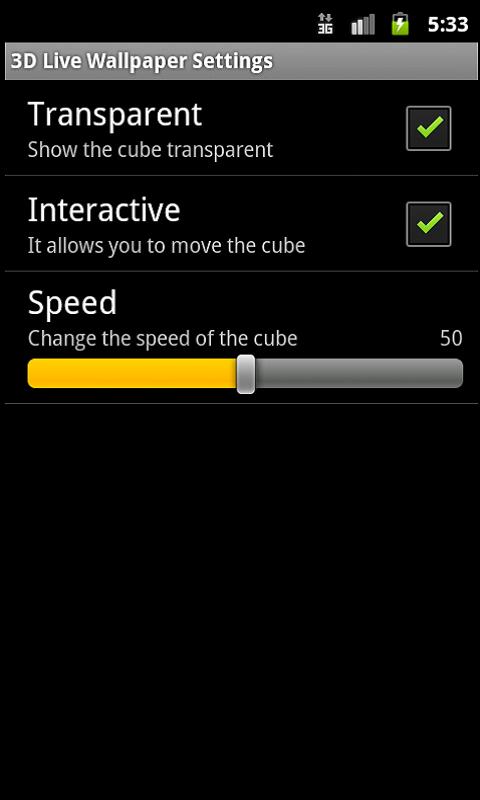
Description


Great live wallpaper which will allow you to enjoy Burma's Flag all of the time. The
live wallpaper is interactive, reacts to movement and you can configure
the velocity and the transparency, and cancel the interactive function
if you so prefer (in the Adjustments menu).

Includes a direct
access link to see the emblem and to more quickly access the preferences
section. In order to install or configure the screen saver, you must
follow these steps:

- Click on Menu

- Click on wallpaper

- Click on live wallpaper. Here is where we will find the live
wallpaper. Once we have clicked on it, we will be able to access the
settings or, alternatively, we can click on Set wallpaper in order to
finish.


                  Download => Link 1 / Link 2 / Link 3
                                  ၀င္းလႈိင္(နည္းပညာ) မွ ျပန္လည္ မွ်ေ၀ပါသည္။